· Clelia Astra Bertelli · Coding · 8 min read
The anatomy of a document processing agent
Exploring the building blocks of LobsterX, a document-processing agent inspired by OpenClaw
Not long ago, Peter Steinberger created a new generalist AI agent named ClawdBot (and now renamed to OpenClaw), which drew massive attention from the tech world because of the ease of setup, wide extensibility and connection to many major everyday communication channels, like Discord, WhatsApp and Telegram.
Inspired by OpenClaw, I decided to create LobsterX, a generalist agent with a special focus on document processing, backed by LlamaCloud products and working as a Telegrams bot.
Despite being much smaller than OpenClaw (approx. 600 lines of code of implementation, + approx. 1500 lines of code of the base orchestration engine), LobsterX contains all the base building blocks for a functioning AI agent with document processing capabilities:
- Tool calling (with access to document processing, filesystem, memory and task tracking tools)
- Self-reflection informed by previous actions
- Looping until the main task and all the sub-tasks are done
There are also some other features a little less common in generalist agents, such as:
- Access only to a virtual filesystem (AgentFS), to avoid damaging your real one
- No permission to execute bash commands, to avoid performing exploitable or destructive operations
- No support for skills, although you can extend the behavior of the agent through an AGENTS.md file.
In this blog post, I will go through the anatomy of this agent, and try to explain how I built its abstractions and moving parts.
The LLM as Foundation
At the heart of LobsterX there’s an LLM model: it is the main actor, producing thoughts and observations over the current situation (given the previous chat history), and taking actions with tool calling.
LLMs, though, are notoriously non-deterministic, so how are we able to produce exactly the output that we need for a specific context (tool calling, thinking, observations…)?
The main trick is to use structured outputs: the three supported LLM providers for LobsterX (OpenAI, Google and Anthropic) offer models that are able to follow more-or-less complex JSON schemas and produce high-quality JSON-based responses.
If you take a look at the definition of the OpenAI LLM and the definition of the general LLM wrapper client, you will see that LobsterX, in its core agentic architecture, heavily relies on structured outputs (in fact, it only has methods to perform structured generation).
The structured generation helps us steer the LLM to produce exactly the needed output for the four main operations it can perform:
- Think: think about the next reasonable action to take, based on previous history
- Act: tool calling, based on the thought trace produced
- Observe: observation of the state of things, based on tool results
- Stop: stop on task completion
These four operations are the base for the agent loop.
The Agent Loop as Task Executor
Despite the LLM being at the core of the agent machinery, there many more gears moving around it to allow the model to interact with the external world: these gears are collected within the agent loop, a LlamaIndex Agent Workflow that offers an event-driven, stepwise task execution engine.
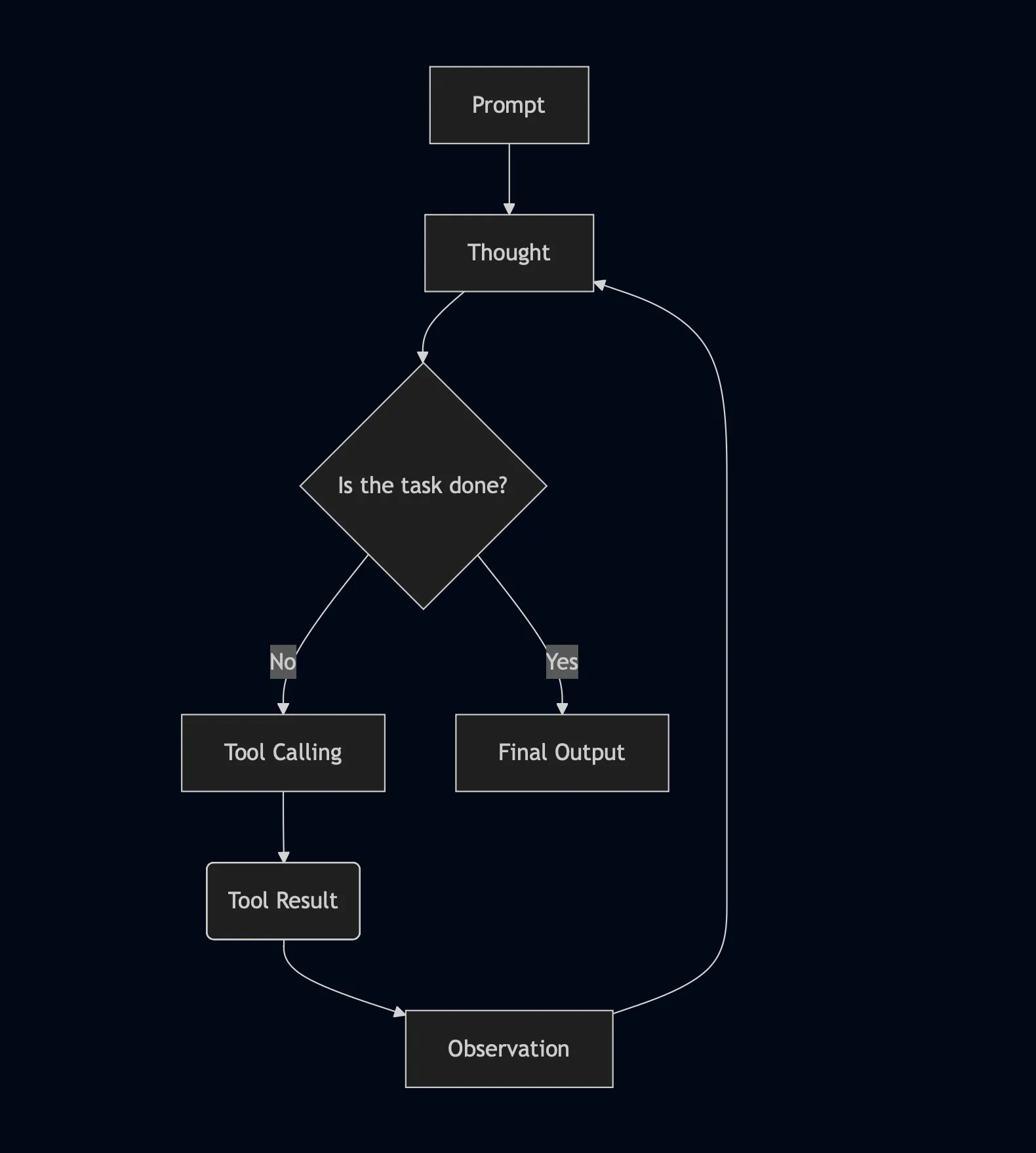
The prompt is received by the workflow through an input event, which signals the start of the workflow, and the task execution proceeds like this:
- The LLM produces a thought, which gets dispatched within a thinking event to the following step
- The LLM decides whether to call a tool or exit the task execution loop (which generally happens after at least one cycle): if a tool needs to be called, a specific events triggers the tool calling step, otherwise a stop event is produce and the workflow ends
- The tool calling step produces a tool result event, which prompts the LLM to create an observation on that result. After the observation, the loop starts again from the thinking step
Here is a visualization of the agent loop:
Windows on the World: Filesystem, Tools and Chat Interfaces
What we’ve described so far is a generalist architecture.
What really defines a document processing agent are the interfaces through which it interacts with the external environment, its “windows on the world”.
LobsterX has three main points of contact with the external environment:
- The filesystem
- Tools
- The Telegram chat interface
Filesystem
Filesystem and tools work very closely: FS operations are exposed to the agent through tools, which in turn do not interact with the real filesystem, but with a virtualized copy mounted through AgentFS.
The reason behind using AgentFS is simple: giving to an autonomous agent, with semi-long running workflows, a full read and write access to the filesystem is highly dangerous, especially if the agent is deployed on a machine that is not only dedicated to it. The risk (and the effects) of the agent performing destructive operations (like the infamous rm -rf / ) is minimized by using a virtual filesystem, given the fact that, even if the agent was to write unsafe files (driven by a malicious prompt) or to erase the entire filesystem, the real FS of the machine on which the agent is running would be completely unaffected.
Also, the tools to interact with files have limited capabilities in terms of destructive or security-critical operations: the agent can only use read, write and edit tools (so it cannot delete files on its own), and can only write plain-text files (even if the files where malicious scripts, the agent does not have the control of the shell and it wouldn’t be able to execute them).
It is also important to note that LobsterX, by default, does not have access to the entire machine filesystem, but only to the working directory where it is running and its children elements.
Obviously, the safety-first approach I took with LobsterX limits the “range of motion” of the agent, since the agent doesn’t really control the machine on which it is deployed and it’s constrained into well-defined interactions, but this is a critical component of a document processing agent: you can’t take the risk of it deleting its own data source (the filesystem) or of it executing commands that could corrupt documents, leak credentials or introduce security risks.
It is nevertheless important to note that I am not claiming that LobsterX is 100% safe: attackers could still exfiltrate sensitive data from documents that LobsterX has access to through prompt injection, as well as maliciously steer the agent through other attacks. It is then always important to monitor what the agent has access to and how it is behaving in general.
Tools
We talked about filesystem tools, but we didn’t mention the ones that really unlock document processing: the parsing, structured data extraction and classification tools.
As opposed to “base” filesystem tools (read, write, edit), which work on plain-text files, these are specifically tailored to work on unstructured documents, such as PDFs, Word documents, Power Point presentations, Excel sheets and many more formats.
Also, these tools do not perform “mechanical” operations (such as the read/write ones), but they actually take the document content and use a mixture of OCR, VLMs and agentic approaches to understand the file content and carry out downstream tasks such as full text parsing, structured data extraction following a given JSON schema or classifying the file based on specific categories.
These tools are all provided by LlamaCloud, the platform that LlamaIndex offers for advanced document parsing and to build and automate complex documents workflows, and they can be used on user-provided files thanks to the fact that LobsterX accepts document uploads through its Telegram chat interface and download these documents to the AgentFS storage.
This is exactly what makes a difference between a generalist agent and a document-oriented one: being able to manipulate files through tools that offer advanced document-understanding capabilties, such as LlamaParse, LlamaExtract and LlamaClassify from LlamaCloud.
Telegram Chat Interface
The Telegram Chat Interface is an extremely import part of LobsterX’s interaction with the external world, since it allows two main things:
- The user can send
.txt,.pdfand.docxdocuments through the chat interface for the agent to download them and use them for downstream processing tasks - The user can start an agent’s task by sending a text message
Besides the interaction potential, though, the Telegram chat interface is designed for something that most AI chatbot interfaces are not: asynchronicity. Just as with your friends, who you don’t expect to text back immediately once you send them a message, the agent is able to perform its work in the background and only update you (through push notifications via the Telegram app) when its work is done.
Since document workflows, depending on the complexity, can require from a few minutes to half an hour to be completed (or even more), it is really important to have a chat interface that does not make the user “wait” (through a loading screen or a spinner), but that simply pings them when the task is completed.
Besides that, the Telegram python library to build bot is extremely easy to use and highly async-friendly, which is perfect for LlamaIndex Agent Workflows to run, since they are async-first.
Conclusion
In this blog post, we dove deep into the anatomy of LobsterX, a document-oriented AI agent inspired by OpenClaw, that works as a semi-long running, autonomous agent through a Telegram bot.
To summarize the main takeaways, and to go back to the “anatomy” metaphor, we can say that:
- The brain of a document processing agent is an LLM, steered to think, observe and take actions through structured outputs.
- The limbs are the tools, with which the agent can manipulate documents and work on them.
- The eyes are represented by the filesystem, that the agent can source its data from.
- The ears and mouth of a document processing agent are the chat interface, through which the agent listens to user input and replies to it.
Of course, LobsterX is way simpler than the original OpenClaw, but it is its very own simplicity that allows you to go through its codebase, identify the base abstractions, the building blocks and the moving parts, and understand how the agent is built at its core.